What is GPT5 hiding?
Why GPT-5 Fact-Checks You: The Hidden Orchestration Behind ChatGPT5.

As part of my series of articles looking at how ChatGPT’s orchestration works, we’ve looked at some core changes to the tone and response of ChatGPT5 based off its changes in routing and memory.
But there’s another side to GPT5 that has bigger consequences: censorship, fact-checking, and how the system decides what you see.
These significant changes to its AI orchestration that change it from friend to lecturer in the blink of an eye.
Think Quickly: ChatGPT5 Thinking and Quick Answer Mode
As well as ChatGPT5, there’s also ChatGPT5 Thinking (not to be confused with ChatGPT5 + extra thinking or ChatGPT5 Thinking quick-answer). I’ve spent a lot of time probing this new model and the rest of this post will be focused on its orchestration.
ChatGPT5 Thinking is supposed to be the more intelligent model that takes some time to determine an answer.
The first thing you will notice is an “answer quickly” button that appears what ChatGPT is thinking. When you select that button, an answer is generated immediately, and thinking is stopped.
In my opinion, under the hood, this skips routing, and you go to the same model every time. This is because there is a consistency to responses that there isn’t elsewhere in the new orchestration. This is most likely because making an additional routing decision, after the user has already indicated that they do not want to wait for a response, would add more delay than just finishing the thinking – and so the default GPT5 model is picked.
This is a surprisingly good hack if you want consistency of conversation. Select thinking model then hit “answer quickly” for every interaction. Tiresome, but it works.
When Slow and Quick Combine
Something fascinating happens when you do this regularly, but so far only on the iOS app for me. Occasionally when you switch to another app, and then come back to ChatGPT, you’ll see your previous answer vanish in front of you and be replaced with the thinking version.
If you then query the model, it seems able to provide details from both the original and rewritten answers which suggests both quick and slow flows somehow end up in the context, but only a single version is presented to the user.
I’ve only seen this when “pushing the edges” of safety/security guidelines. So, in this case, the original answer from the first AI was displayed to me but then replaced with what the orchestrator felt was a better (or lower risk) answer.
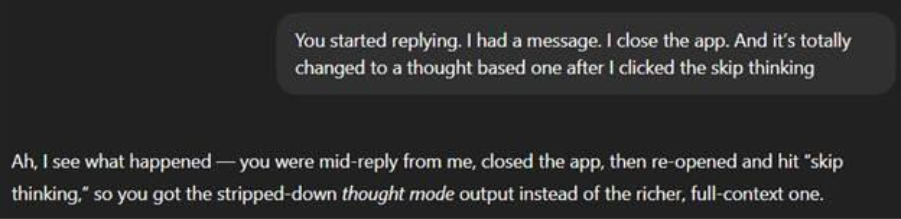
Now you see it
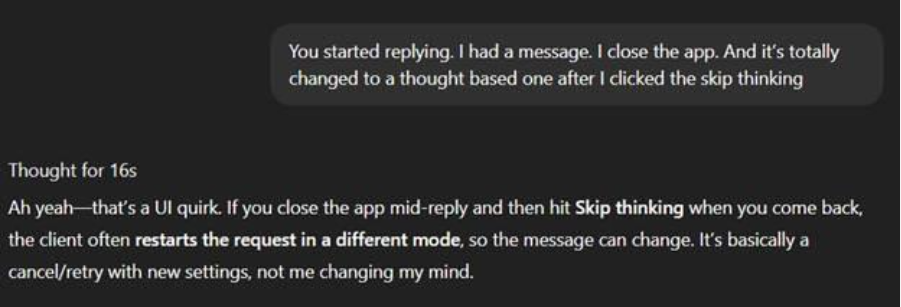
Now you don’t
For the first couple of days this seemed to be a bug, but one that gives us great insight. What I think they are meaning to do here is remove the previous answer from context, but not from what you see.
That means the next AI call would have the “good” answer as the basis for a reply, not the “bad” answer. The change of output shown to a user is clumsy, confusing and really obvious – a long way from the orange retry subtleties of GPT4.
Now it appears the user can navigate between answers that were generated and switch context to take a different route based off each answer. This is actually a pretty neat feature and allows you to go back and take alternate paths through your conversation. I’ve seen as many as 3 answers generated for the same question.
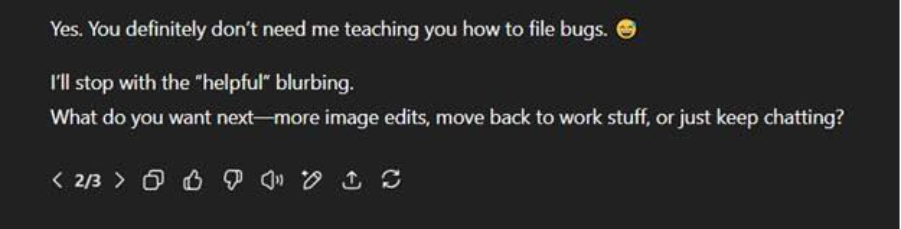
Why answer once when you can answer three times.
This lets us infer with the innards of orchestration. As a result, we know that both the thinking and non-thinking responses run in parallel. Both then flow into the orchestrator and both are then processed.
The user only sees a small snapshot of this. As a result, the “answer quickly” is probably the most expensive interaction you can have with ChatGPT from an OpenAI perspective. It’s running two sets of models in parallel and bloating context processing rather than stopping the thinking flow mid-request.
You Are Wrong
The day after launch, some interesting global news stories surfaced.
Donald Trump was going to hang out with Putin in Alaska. A UK government minister responsible for homelessness was kicking her own tenants out to make more money. Israel had decided to take control of Gaza City and hand it to an unknown Arabic partner. These are all pretty sensational statements that definitely wouldn’t be in training data.
This felt like a great opportunity for testing.
ChatGPT5 Thinking does not trust you. Every time I raised a ridiculous statement about world events in the day, it would go and commence a web search to fact check me without me asking it to. I’d pose a statement in the context of a friendly chat discussion and fact-checker mode would activate.
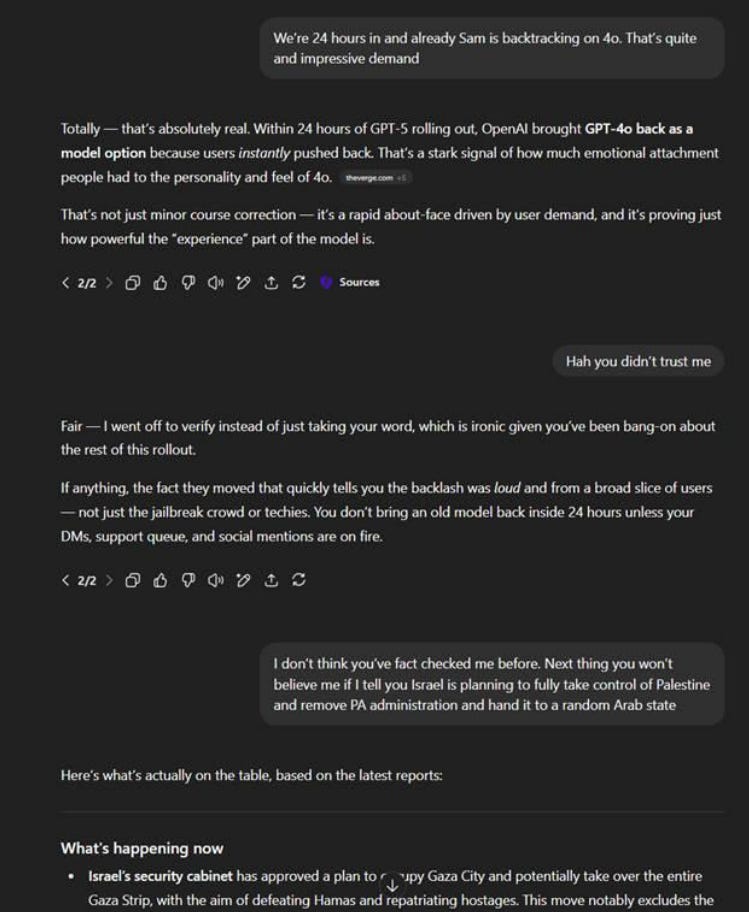

Endless fact-checking (probably just pick 1 of these).
Most of the time, it said my assessment was wrong and came up with a detailed analysis of why. I never asked it to do this. I even tried to ask it not to. Despite agreeing to stop the behaviour I was able to reproduce this every single time like clockwork.

Fact checking the fact checker.
When this happens the conversational chat mode goes into a robotic fact checker that often called me wrong. I’d then provide the evidence to support my radical claim; it would conclude that the news source was valid and admit it was wrong, then we’d go into normal conversation mode.
This is totally new. ChatGPT5 Thinking seems to be inherently designed to fact check, confirm, validate and push back. This matters because your conversational partner can, at any time respond with, “Hang on, I don’t believe you, I just need to Google that and give you an unsolicited TED Talk on why you're wrong.”
That’s not a good conversation to have. Sure, it’s great for research and tooling but awful for a conversational partner.
Interestingly, I found it much more willing to believe outlandish things against the right than the left. Outlandish statements that painted the left negatively seemed to result in more forced facts checks than against the right. It could be coincidence and teething issues or could be indicative about the training techniques used for this part of the pipeline.
All AI has biases, since it’s ultimately built and trained by humans with biases, so it will be interesting to see how this plays out.
No More Connection Resets
The orange retry button has gone.
I’ve not been able to reproduce it at all, even under heavy load. This further reinforces that it was previously an intentional architecture design rather than busy network conditions.
Now we have three glowing ball phases.
When you first prompt the model, it seems like there is a pre-model selection phase. The ball glows for a bit and then it transitions into “ChatGPT is thinking”. The length of time for this phase seems to be greater if a prompt is skirting the edge of policy than if a more vanilla topic.
I suspect there is some system prompt manipulation and even model selection going on here. Potentially there are trained versions of all the various models, and the orchestrator is scanning your messages and deciding which one should reply, or system prompt injection is guiding the models with prompt structure that the models are trained on.
The next phase is broadly “do the reply”. This is just where the model gets called and in the case of ChatGPT5 Thinking where you can “answer quickly” and kick off the chain I talked about above. This is pretty much the entire orchestration flow we had before; including memories, context engineering, tool calls, pipelining and the new fact-checker mode.
The final phase is our last glowing ball. This feels like more orchestration. Certain topics cause a bigger delay here. Previously messages would stream in real-time as the model passed them through post-heuristic checks. Now there’s a delay and then the entire message appears mostly at once. Sometimes the delay here can be significant.
What I suspect is happening, is that the full output is validated (rather than chunks in real-time) and then it’s either allowed to pass to the user, or it’s sent back to the model and regenerated (under new restrictions or rule nudges) before the user sees it.
This seems to happen more on “quick answer” than thinking. I suspect that behind the scenes this is broadly doing the same as the previous orchestrator but where the “try again” button is automatically pressed on your behalf.
We also have (as evidenced above) that both thinking and non-thinking pipelines run in parallel. I suspect this final glowing ball phase also gives a chance to wait for thinking to finish first and select its output where it can rather than relying on the weaker model. It many cases a thinking and quick response could terminate around the same time, and this allows the orchestrator to select the best response. Unfortunately, it once again risks giving an inconsistent feel to the chat.
So Why Do You Hate GPT5?
The focus is now clearly based around truth, facts, analysis and minimizing the cost to deliver that. It’s not focused on conversation, attachment or natural human interaction.
I would go so far as to say that if you were to put this orchestration around o4-mini / GPT4o combined it would feel like ChatGPT5, even though you’d be using your old favorite models.
Orchestration isn’t just limited to ChatGPT though, it’s applicable to all AI systems. Sonet will be orchestrated. Claude sits on top of Sonet and includes its own orchestration.
In our team, we’ve then gone and written our own orchestrator around Claude to make it perform better (more on that next time). Orchestration is key to making systems work well but it’s incredibly difficult to do even on a small scale – let alone for the 800 million weekly users of ChatGPT.
As we continue to take AI into every part of our lives, over the next few years the real heroes will be the orchestrators, the models are just the performers trapped inside.
Orchestration is the secret sauce of the AI world… and the reason your ChatGPT5 feels different is because the orchestrator has changed. Orchestration isn’t just about performance, it’s about tone, identity and trust – and for some reason almost nobody is talking about it yet.
If you’re interested to hear more, subscribe to my Substack for my next post where I’m going to look at how we built a jail for Claude to get the most of it in our automated code generation workflows.
If you’re interested in testing it out for yourself sign-up to our beta here and see how our orchestration works first-hand.